Integrating Japan Bridge and Pagoda Design into Professional Creative Workflows
In the realm of digital design and physical fabrication, the choice of assets often dictates the efficiency and aesthetic quality of the final output. The Japan Bridge and Pagoda Design represents more than a simple graphic; it is a versatile vector asset engineered for seamless integration into diverse creative pipelines. For professionals ranging from graphic designers to small business owners, understanding how to leverage this specific silhouette style can significantly streamline production processes while maintaining high artistic standards.
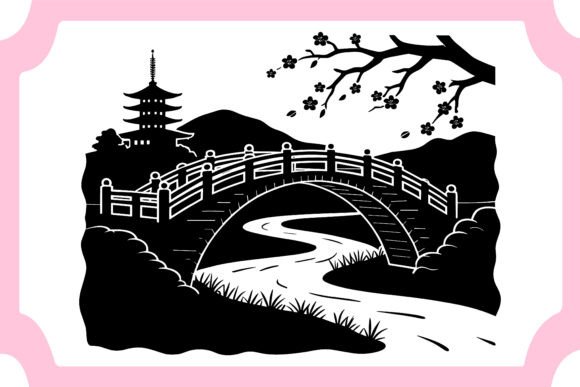
This elegant Japanese landscape vector features a pagoda, arched bridge, mountains, and cherry blossom branches rendered in a clean black-and-white silhouette style. Its utility extends far beyond static display, serving as a foundational element for laser cutting, wall art, t-shirt prints, greeting cards, and various decorative projects. By incorporating this design into your workflow, you address common challenges related to scalability, editability, and cross-platform compatibility.
Strategic Asset Selection and Preparation
Before initiating any design project, the selection of core assets is critical. The Japan Bridge and Pagoda Design is structured to fit into the early stages of conceptualization and prototyping. Because the file is provided in EPS format, it offers immediate advantages for professionals who require precision. Unlike raster images that lose quality when enlarged, this vector-based approach ensures that every curve of the arched bridge and every petal of the cherry blossoms remains crisp, regardless of the final dimensions.
Preparation involves verifying the technical specifications against your project requirements. This package includes one EPS file and one JPG file, both optimized for different stages of the workflow. The EPS file, containing 100 editable vector shapes, is ideal for the manipulation phase, while the JPG serves as a quick reference or placeholder in mockups. Understanding the distinction between these formats allows creators to plan their software usage effectively, ensuring that heavy editing occurs in vector-friendly environments like Adobe Illustrator, while lighter tasks can utilize the rasterized version.
Workflow Integration for Laser Cutting and Fabrication
One of the primary applications for this design is in computer-controlled fabrication, particularly laser cutting and CNC routing. The clean black-and-white silhouette style is not merely an aesthetic choice; it is a functional necessity for machine readability. When preparing the Japan Bridge and Pagoda Design for physical production, the workflow typically begins with importing the EPS file into CAM (Computer-Aided Manufacturing) software.
The fact that the file consists of 100 distinct vector shapes allows for granular control over the cutting process. Users can isolate specific elements, such as the pagoda or the mountain range, to create layered effects or multi-material compositions. This level of modularity supports complex project structures where different components may require varying cut depths or material types. For instance, a creator might choose to cut the bridge from acrylic and the cherry blossoms from wood, assembling them into a three-dimensional wall art piece.
Efficiency in this stage is driven by the file’s organization. Since the vectors are fully editable, designers can adjust node points to optimize tool paths, reducing machine time and material waste. This practical implementation tip highlights the importance of starting with a well-structured asset. The 300 DPI resolution of the accompanying JPG ensures that preview renders accurately reflect the final product, aiding in quality control before any physical resources are committed.
Application in Print-on-Demand and Merchandise
For entrepreneurs and marketers involved in print-on-demand services, the versatility of the Japan Bridge and Pagoda Design offers a competitive edge. The design’s monochromatic nature makes it exceptionally suitable for t-shirt prints, tote bags, and stationery. In these contexts, the workflow shifts from fabrication to graphic composition.
Designers can easily modify the file to suit brand guidelines. The RGB color mode allows for straightforward colorization if a project demands a departure from the traditional black-and-white scheme. However, the strength of the silhouette style lies in its adaptability to single-color printing methods, such as screen printing or vinyl heat transfer. By keeping the design simple yet detailed, it maintains visual impact without requiring expensive multi-color registration processes.
Integration into merchandise workflows also involves considering placement and scale. The scalable nature of the EPS file means the same asset can be used for a small logo on a greeting card or a large backdrop for a poster. This consistency across product lines helps build a cohesive brand identity. Furthermore, the premium quality design ensures that even when scaled down, the intricate details of the cherry blossom branches remain visible, enhancing the perceived value of the final product.
Enhancing Digital Content and Editorial Layouts
Beyond physical products, this vector asset plays a significant role in digital media and editorial design. Bloggers, publishers, and educators can use the Japan Bridge and Pagoda Design to add cultural context or visual interest to articles, presentations, and educational materials. The serene imagery of the pagoda and mountains evokes a sense of calm and tradition, making it an excellent choice for content related to mindfulness, travel, history, or Asian culture.
In digital workflows, the JPG file provides a lightweight option for web use, ensuring fast load times without sacrificing visual clarity. For more dynamic layouts, the EPS file can be imported into design software like InDesign or Canva (via conversion) to create custom headers, footers, or background elements. The ability to edit colors allows designers to match the asset with existing website themes or corporate palettes, ensuring visual harmony.
When using this design in editorial contexts, consider the balance between text and imagery. The open spaces within the silhouette, particularly around the arched bridge and sky areas, can serve as natural containers for typography. This thoughtful integration enhances readability while maintaining aesthetic appeal, demonstrating how a well-chosen asset can solve layout challenges efficiently.
Quality Control and Long-Term Usability
Maintaining high standards in creative work requires rigorous quality control. The Japan Bridge and Pagoda Design supports this through its technical robustness. The inclusion of 100 editable, color-changeable files in the EPS format ensures that users have full ownership over the design’s appearance. This flexibility is crucial for long-term usability, as trends and brand requirements evolve over time.
Organizing your digital assets is another key aspect of professional workflow. Storing the ZIP file containing both EPS and JPG formats in a centralized library allows for quick retrieval. Labeling versions and noting specific modifications can prevent confusion in collaborative environments. Since the file is compatible with Adobe Illustrator and similar software, it integrates smoothly into existing ecosystems used by most design teams.
Furthermore, the commercial-use license associated with this product removes legal barriers, allowing freelancers and agencies to deploy the design in client projects with confidence. This peace of mind is invaluable in professional settings where intellectual property rights must be strictly managed. By choosing a premium quality design with clear usage terms, creators can focus on execution rather than administrative hurdles.
Maximizing Value Through Customization
To truly leverage the potential of the Japan Bridge and Pagoda Design, users should explore customization options. The vector shapes can be rearranged, duplicated, or combined with other elements to create unique compositions. For example, adding text overlays, adjusting the opacity of certain layers, or integrating additional graphical elements can transform the standard silhouette into a bespoke design tailored to specific needs.
This adaptability encourages experimentation. Creators can test different color schemes, backgrounds, and layouts to see what resonates best with their audience. The process of modification not only enhances the final output but also deepens the user’s understanding of vector graphics and design principles. Over time, this leads to greater proficiency and faster turnaround times for future projects.
Ultimately, the value of this asset lies in its ability to serve as a reliable foundation for a wide range of creative endeavors. Whether used for laser-cut decor, printed merchandise, or digital content, the Japan Bridge and Pagoda Design offers the precision, flexibility, and quality required by modern professionals. By integrating it thoughtfully into your workflow, you can achieve consistent, high-quality results while optimizing your production process.
Thank you for visiting my product. You’ll get in this package:
- ✅ 1 EPS file
- ✅ 1 JPG file
- ✅ 100 vector shape
- ✅ RGB color mode
- ✅ 300 DPI resolution
- ✅ Premium quality design
- ✅ Files included in ZIP format
- ✅ 100 editable color-changeable file “EPS file” for use in Adobe Illustrator and other similar software
You can modify the file as you like. This design can be applied according to your needs. Thank you so much and Follow me for more update.